Product2 publishersIndependently confirmed3 min readPublished
Google Docs now edits Markdown files without turning them into Docs
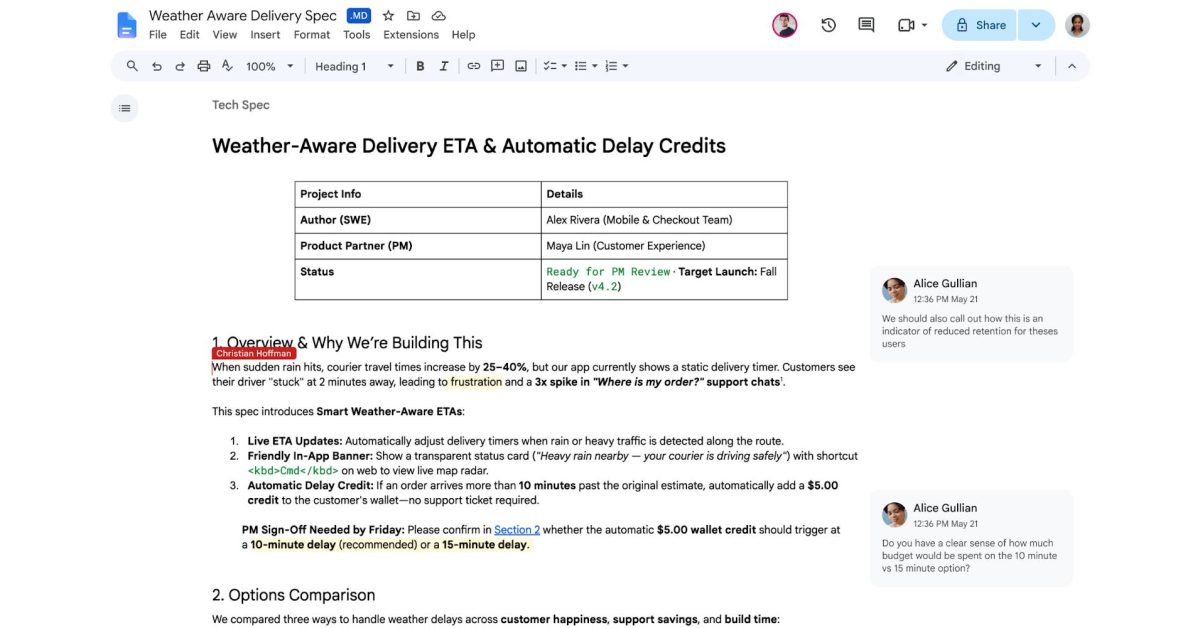
Google Docs now edits .md and .markdown files natively, keeping them as Markdown, in a rollout that began Oct. 5 and can take up to 15 days. Documentation teams can now review the file that actually ships, though reviewers lose some of the visual markup Docs normally keeps.
The Product Desk
What happened
- Drive now renders Markdown previews with formatted tables and clickable links, so a file can be read without opening an editor.
- Some Docs formatting is lost in Markdown: smart chips can become text or links, HTML turns to plain text, and font colors, highlights and alignment are removed.
- 9to5Google reported the feature is enabled by default, including on admin-controlled accounts.
- Google tied the update to AI, saying large language models use Markdown to keep headings, lists and tables intact across tools.
Compiled by The Product DeskSomething wrong?How this is made
Why it matters
- decision Documentation leads now have to choose, per document set, between keeping Docs' visual review markup and keeping one Markdown file as the single source of truth.
- capability Reviewers who never touch a repo can comment on the exact file that ships, instead of on a converted copy that someone later has to reconcile.
- constraint Teams whose notes form a linked knowledge base gain little, because Docs works one file at a time without vault-style backlinks, graph navigation or properties.
Take an install guide kept as a .md file because the docs site builds from it, and a reviewer who works only in Google Docs. Before the Oct. 5 release [1], the two met in a copy. Docs could already handle Markdown shortcuts and pastes and import and export .md files [4], and Drive's earlier Markdown steps mostly converted files into something Docs could use [10]. The reviewed version was a Google Doc, and someone had to export it back to .md. The new mode puts sharing, comments and real-time co-editing on the original file [8].
Google frames the change around AI agents [5]. Google's Chandu Thota said Markdown "has become the common language between humans and AI agents," 9to5Google reported [7]. The company wrote: "Editing Markdown files in Docs also enables both users and agents to collaborate without forcing anyone to write raw syntax, handle manual file conversions, or give up Docs' real-time editing and commenting tools." [6] It also named syncing with Gemini Notebook as one beneficiary [9].
Here is what teams tell themselves users will do with that: an agent drafts, a person refines, both in one live file. Here is what documentation teams will do first: stop exporting, because it removes a step from work they already do. The agent workflow depends on agents being connected to Drive files. Neither report includes usage data for agent editing.
The cost falls on reviewers. The formatting that drops out [12] is mostly reviewer markup, like a yellow highlight on a doubtful sentence or red text for a correction. Comments are supported [8]; highlights are not [12]. I'd move review into native Markdown for any document that ships from a repo or a docs build, and ask reviewers to put every change request in a comment. Reviewers who scan a draft for color lose that view of it.
For the person rolling this out, the default matters as much as the feature. Nobody opts in, according to 9to5Google [11]. The audience is all Workspace customers and personal Google accounts [13], so the first a docs lead hears of it may be a reviewer editing a .md file directly in Docs.
TechRepublic, working from Google's and Obsidian's documentation without hands-on testing [15], concluded that Docs now covers enough of the Markdown workflow to replace a separate editor for some teams, especially those writing, reviewing and sharing individual files [16]. Its case for Obsidian rests on features that span many linked notes in a local vault [14].
To decide per document set, sort on two lines. One is where the file ends up: outside Google, in a repo or a docs-site build, or inside Drive. The other is whether review depends on visual markup. Outside Google, comment-only review: open the .md in Docs and drop the export. Outside Google, color-coded review: change the review habit first, or keep converting. Inside Drive, color-coded review: stay in Google Docs format, since nothing downstream reads Markdown. Inside Drive, plain review: either format works until an agent needs to read the file.
What to watch
- Whether Google gives Workspace admins a control to switch native Markdown editing off, after 9to5Google reported it is on by default for managed accounts.
- Whether every account has the feature by about Oct. 20, the end of the 15-day rollout window.
- Whether Google documents where comments on a .md file go when the file leaves Drive for a repo.