Product2 publishers3 min readPublished
Final Cut Camera puts the iPhone 18 Pro's aperture control on a nearby iPad or Mac
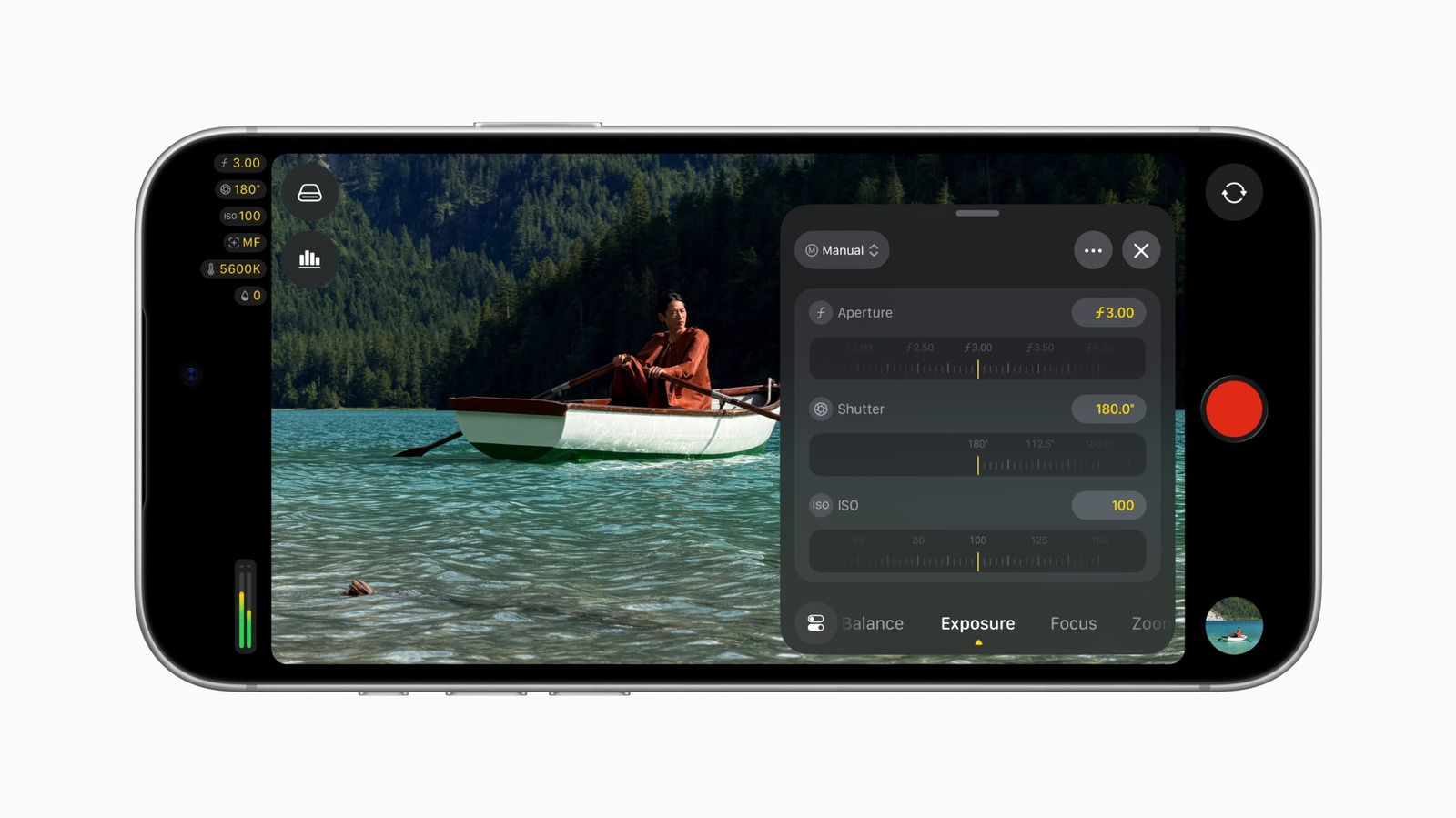
Apple updated Final Cut Camera so iPhone 18 Pro owners can set the variable aperture on the phone or from a nearby iPad or Mac. The remote control works through Final Cut Pro, one of the apps in Apple's $12.99-a-month Creator Studio.
The Product Desk · Product desk
What happened
- Apple says the app was rebuilt from the ground up to put shutter angle, ISO and white balance within easy reach.
- On the Mac, Final Cut Pro and Motion can adjust focus points and depth of field in iPhone 18 Pro footage after the shoot.
- Engadget reports that the new camera settings work only on an iPhone 18 Pro.
Compiled by The Product DeskSomething wrong?How this is made
Why it matters
- constraint Crews using older iPhones as second cameras will have the new controls on one body only, so they cannot run the same exposure workflow across the whole kit.
- capability A solo operator can leave the phone locked on a rig and change aperture from the Mac during a take, without touching the camera.
- decision Post teams now have to pick a delivery format, because Compressor can turn edited Cinematic footage back into the older format for collaborators who need it.
Take a one-person interview shoot. The iPhone 18 Pro is on a tripod at the subject's eye line, and the operator is at a Mac across the room. Halfway through an answer, the light changes. Final Cut Camera lets Final Cut Pro control the phone remotely, and Engadget reports that the same settings, aperture included, can be changed from a nearby iPad or Mac [7]. The operator can stop down without walking into the shot.
Apple promoted the variable aperture when it announced the phone earlier this month [12]. In Final Cut Camera it shows up as a direct control, plus aperture priority and shutter priority modes [2]. Those are the features Apple pitched. The tools a crew uses all day sit elsewhere in the release: customizable false color and clipping overlays, and focus peaking with sensitivity control [4]. A tally light now comes on while the phone is recording [5].
Lower down MacRumors' list are the features that, in my view, show who the release is for. A crew wiring the phone into a larger, synchronized production gets clean SDI out and genlock offset, along with professional video scopes [6].
For whoever approves the purchase, the phone comes first. According to Engadget, the new camera settings require an iPhone 18 Pro [10]. A crew that uses older phones as second cameras will have the new controls on one body only.
The remote control works through Final Cut Pro [7]. MacRumors lists Final Cut Pro among the apps in Apple Creator Studio, which costs $12.99 a month [11]. That comes to $155.88 a year per subscription [1].
Then there is the edit. MacRumors says Final Cut Pro and Motion on the Mac can apply Cinematic mode effects to iPhone 18 Pro video, so an editor can move focus points and change depth of field in the timeline [8]. I'd expect teams that send files to collaborators on older setups to care most about Compressor. It can convert that footage back into the previous Cinematic mode format, and it gains HEVC and MPEG-4 export presets [9].
Two conditions settle the decision. The first is whether the phone sits out of the operator's reach during a take. The second is whether the footage leaves the phone for a Mac edit or a live feed.
- Out of reach, and the footage leaves the phone: this update is aimed at you. Budget for the 18 Pro and the subscription. - Out of reach, and the footage stays on the phone: remote aperture control is the reason to buy, and the Mac post tools are optional. - In hand, and the footage leaves the phone: most of the value is in the depth of field edits in Final Cut Pro and the Compressor presets [8][9]. - In hand, and the footage stays on the phone: you get the redesign, with ISO and white balance closer to hand and a two-finger tap that clears the viewfinder [3][5]. It still requires an iPhone 18 Pro [10].
What to watch
- Whether remote aperture control works as fully from an iPad as from a Mac in shipping builds, since Engadget is the only source that describes the remote path.
- Whether Final Cut Pro for iPad gets the depth of field and focus point edits, which MacRumors describes only for the Mac.
- Whether Apple sells Final Cut Pro access outside Creator Studio, which would change the cost of the remote workflow.