BuildIndependently confirmed2 publishers2 min readPublished
TrashBench's RTX 3080 core ran 16.7C cooler on a riser at the side intake
TrashBench cut an RTX 3080's hotspot by about 19C by moving it on a riser cable against a case's side intake. The CPU ran 1.1C warmer in that position, TechSpot reported, so the CPU gains in that build came from other changes.
The Engineer · Build desk
Key figures: with the card against the side intake, the GPU hotspot dropped 19.3C and the CPU warmed 1.1C. Combining the intake radiator with the card beside the side intake gave a 14C cooler hotspot and a 3.3C reduction in CPU temperature.
- 19.3 C drop GPU hotspot, card against the side intake, claim 4
- 14 C drop GPU hotspot, intake radiator plus card at side intake, claim 5 sacrificing some GPU cooling
- 1.1 C rise CPU, card at side intake, claim 4
- 3.3 C drop CPU, intake radiator plus card at side intake, claim 5 for a better overall balance
| Figure | Value | Note | Claim |
|---|---|---|---|
| GPU hotspot, card against the side intake | 19.3 C drop | 4 | |
| GPU hotspot, intake radiator plus card at side intake | 14 C drop | sacrificing some GPU cooling | 5 |
| CPU, card at side intake | 1.1 C rise | 4 | |
| CPU, intake radiator plus card at side intake | 3.3 C drop | for a better overall balance | 5 |
What happened
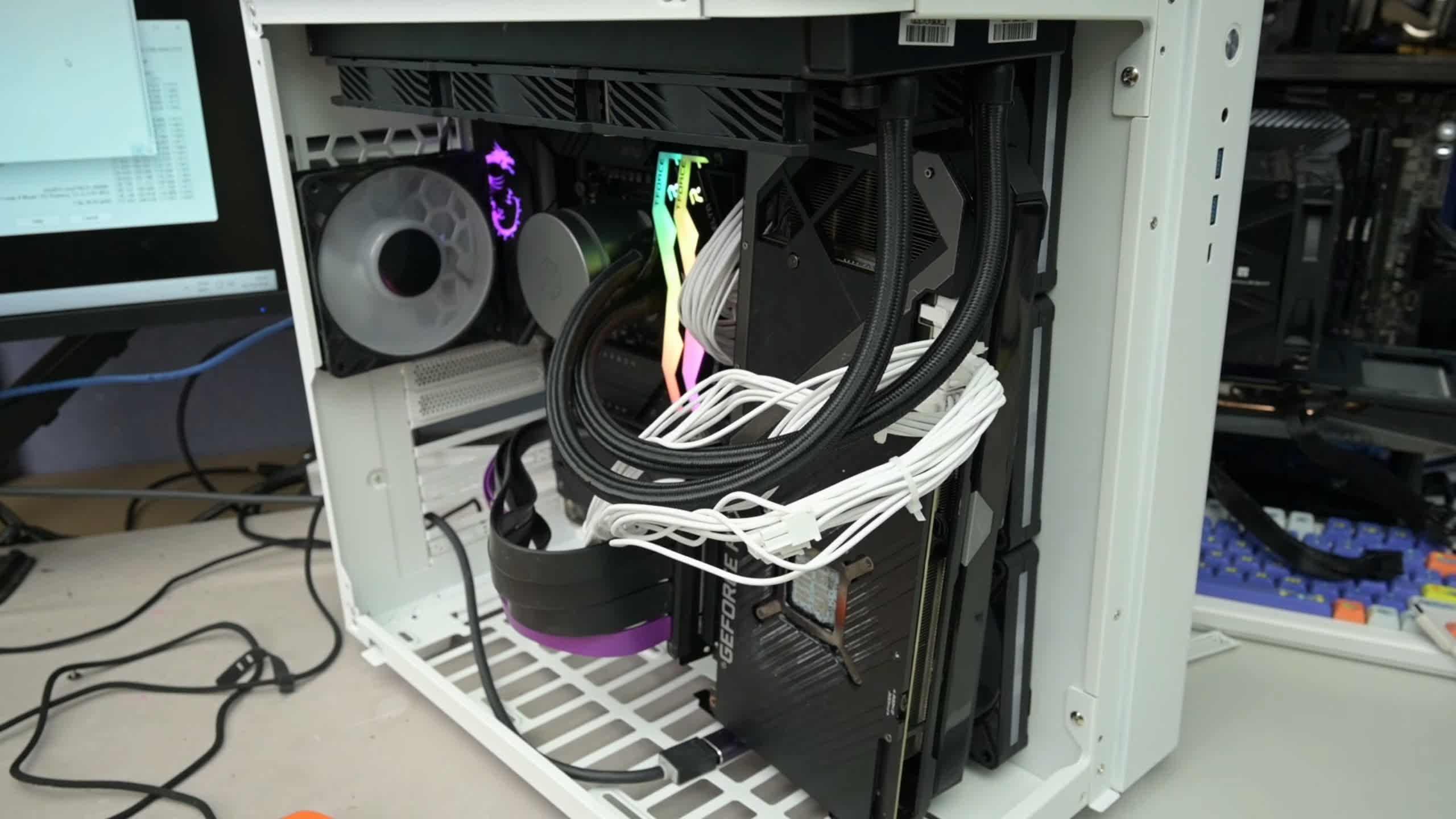
- The card was an Asus ROG Strix RTX 3080 in a dual-chamber case with three side-intake fans, a rear exhaust and a top-mounted 360mm CPU AIO.
- Each layout ran 3DMark Time Spy alongside 7-Zip on 12 CPU threads at fixed fan RPMs, for ten minutes, with temperatures averaged over the final five.
- On the case floor the GPU barely changed, but the CPU dropped about 4C and the motherboard VRM about 7C.
- At the side intake the core fell 16.7C and VRAM 14C, and the motherboard VRM also dropped about 8C.
Why it matters
- constraint The 16.7C belongs to one RTX 3080 in a dual-chamber case with three side-intake fans. TrashBench himself says different cases, fans and fan positions will likely change the results.
- cost Copying the layout needs a PCIe riser cable, which Tom's Hardware calls essential. The floor position also needed the bottom mesh removed because it touched the card's fans.
- decision On TechSpot's account, a builder whose workload leans on the GPU has reason to keep the radiator exhausting, since its warm exhaust hurt the card. One that leans on the CPU has reason to reverse it.
The two outlets disagree about the final build. TechSpot says the radiator fans were reversed to intake [5]. Tom's Hardware says the radiator stayed in a traditional exhaust configuration [14]. It also writes that the CPU was mounted vertically against the side intake fans, which we take to be a slip for the GPU [15]. Both report the same results, a 3.3C cooler CPU and a 14C cooler hotspot [6][5].
TechSpot's own numbers favor its version. With the radiator still exhausting, the side-intake placement warmed the CPU [4]. Reversing the radiator fans with the GPU in its usual slot is what cooled the CPU, by about 6C [10].
On TechSpot's account, the final build has a price. The reversed radiator moved the CPU from 1.1C warmer to 3.3C cooler, a swing of 4.4C [13]. It also cut the hotspot gain from 19.3C to 14C, a loss of 5.3C [12]. The cause is the radiator's warm exhaust, which in the radiator-only test hurt the graphics card [10]. TechSpot describes the result as sacrificing some GPU cooling for a better overall balance [5].
Neither outlet explains why the side intake works so well. We'd expect the card's fans are now drawing air straight from the three intake fans instead of air already warmed in the chamber. The tests as described do not isolate that.
The fans were also locked at fixed RPMs [3]. For the 16.7C to transfer, your baseline would have to run its fans at the same fixed speeds. A fan curve that ramps with temperature would let the stock layout spin up to compensate, and we'd expect the gap to narrow.
Cabling did not slow TrashBench down. At the start of the first alternative build he said, according to Tom's Hardware, "cable management isn't important here... Is it ever?" [16]
What to watch
- The TrashBench video itself: the radiator orientation in the final build is the detail the two write-ups disagree on, and the footage should settle it.
- A repeat in a different dual-chamber case, or with temperature-driven fan curves in place of fixed RPMs, since TrashBench says other cases and fans will likely change the results.
Clarity's read
What the record supports and how the coverage leans. The claims behind it follow.
Reality
- Evidence45
- Adoption
- Insufficient
- Hype gap+25
- Incentives
- Insufficient
- Confidence55
Claim ledger
Ranked by verification strength, evidence, and original report placement.
- [1]
TrashBench used an Asus ROG Strix RTX 3080 inside a dual-chamber case cooled by three side-intake fans, a rear exhaust, and a top-mounted 360mm CPU AIO.
ReportedSupportedSource: TechSpot, describing TrashBench's video2 sources— create a free account to open themView cited source - [2]
PCIe riser cables were used so the graphics card could be moved away from its usual slot on the motherboard, without moving the case fans.
- [3]
Testing looped 3DMark Time Spy alongside 7-Zip running on 12 CPU threads. All fans stayed at fixed RPMs, with each configuration tested for ten minutes and temperatures averaged over the final five.
- [4]
With the card directly against the side intake, GPU core temperatures fell 16.7C, the hotspot dropped 19.3C, VRAM cooled by 14C, motherboard VRMs dropped around 8C, and the CPU warmed 1.1C.
- [5]
Combining the intake radiator with the GPU beside the side intake gave a 3.3C reduction in CPU temperature and a 14C cooler GPU hotspot, sacrificing some GPU cooling for a better overall balance.
- [6]
Ignoring accepted GPU placement delivered up to a 19C hotspot reduction but adversely impacted CPU temperatures; further tweaking resulted in a 14C hotspot reduction and a 3.3C cooler CPU.
ReportedSupportedSource: Tom's Hardware2 sources— create a free account to open themView cited source - [7]
A PCIe riser cable is essential for this kind of GPU repositioning testing, and TrashBench used them in a number of lengths.
ReportedSupportedSource: Tom's Hardware2 sources— create a free account to open themView cited source - [8]
With the GPU on the case floor, GPU temperatures barely changed, but the CPU and motherboard VRM dropped around 4C and 7C, respectively.
- [9]
The floor position required removal of the bottom mesh because it touched the card's fans.
- [10]
With the GPU back in its usual position and the radiator fans reversed from exhaust to intake, CPU temperatures dropped about 6C, but the graphics card suffered from the radiator's warm exhaust.
- [11]
TrashBench acknowledges the experiment wasn't rigorously scientific, and different cases, fans, and fan positions will likely change the results.
- [12]
The final build gave up 5.3C of the side-intake hotspot gain (19.3C down to 14C).
- [13]
The CPU moved from 1.1C warmer (side intake alone) to 3.3C cooler (with reversed radiator), a swing of 4.4C.
- [14]
In the finalized design, the CPU AIO radiator was in a traditional exhaust configuration.
ReportedContestedSource: Tom's Hardware2 sources— create a free account to open themView cited source - [15]
Tom's Hardware describes the finalized design as having the CPU mounted vertically, directly against the side intake fans.
ReportedContestedSource: Tom's Hardware2 sources— create a free account to open themView cited source - [16]
As he began the first alternative build, TrashBench said: "cable management isn't important here... Is it ever?"
Sources
2 independent publishers whose own reporting we read for this story.
- techspot.comThe traditional PC layout might not be the best: unusual GPU placement cuts temperatures by 17°C
1 article · October 13, 2026
- tomshardware.comModder discovers that putting a GPU in the 'wrong place' can deliver a 19 degree cooler hotspot
1 article · October 11, 2026
Topics and entities
Follow any of these and your For You feed starts watching them — no settings page required.