ProductNot yet confirmed elsewhere1 publisher3 min readPublished
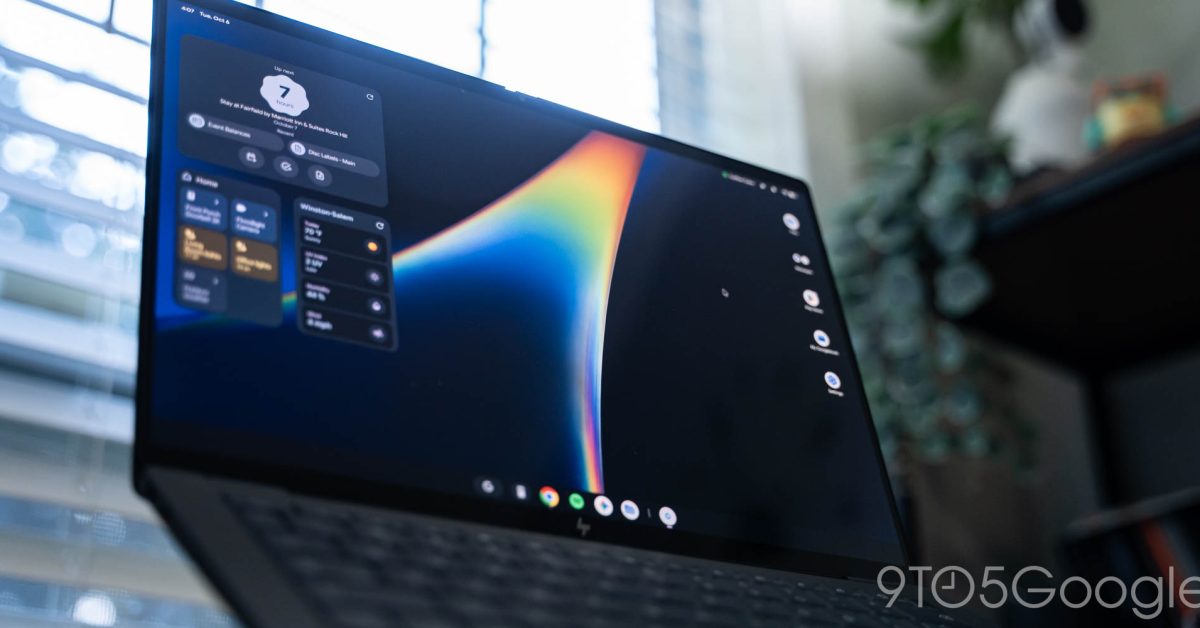
Googlebook OS feels like Android on a desktop after a week of use, 9to5Google finds
9to5Google's reviewer used Googlebook OS for over a week and says it is more optimized than any earlier large-screen Android. The reviewer still calls it a rough first take, and the headline makes the verdict conditional on Google keeping it.
The Product Desk
What happened
- On the HP Googlebook 14, F1 is Android's back button, F2 goes Home and F3 opens Recents.
- The reviewer says the fullscreen and screenshot icons look too much like the Recents key and are too vague to read at a glance.
- The reviewer misses a text expander for macros and wants Gemini in the app launcher.
Why it matters
- decision The first choice is who gets pilot units. The fast adjustment came from a Pixel user, so Android phone owners on staff are the group the evidence supports.
- constraint Shortcut teaching lands on whoever deploys it. A one-page key card for the top row costs less than support tickets about icons that look alike.
- exposure Buyers carry the platform risk. The reviewer ties the rough first take to a strategy reset, so a fleet purchase is a bet that Google keeps shipping Googlebook OS.
Hovering over the media pill in the top-right corner of Googlebook OS lets you play or pause the track. On other desktop operating systems, the reviewer wrote, pausing media always requires two clicks [12]. The reviewer called Googlebook's version "a really nice touch that takes advantage of having a cursor" [13].
The larger claim is about nativeness. "There is a level of nativeness here that I always thought was missing from Chromebooks," the reviewer wrote [11]. The review sets that against a history: it says every attempt to bring touch-era lessons to PCs has failed, including Windows 8 and the Mac's fullscreen apps, and that the iPad came closest because it was built on iOS but failed on the locked-down limitations at its core [16].
The evidence on who this suits is one Pixel user, one HP Googlebook 14 and a little over a week [1][6]. That user said the only real learning curve was keyboard shortcuts [3] and wrote, "I think that will be true for any proficient user of Android smartphones" [4]. That is what one user actually did. What a team will tell itself after reading it is that every employee will do the same. A rollout plan should treat the prediction as a hypothesis about Android phone owners and test it on a few of them.
The reviewer's summary is that "Google has the beginnings of a desktop OS for the Android smartphone generation, but the inherent strategy reset makes for a rough first take" [9]. The review's headline is "A post-smartphone PC, if Google can keep it" [10]. The listed rough edges are small. The review flags icons on 2 of the 13 top-row keys, about 15 percent [15], and the reviewer misses a text expander for macros and Gemini in the app launcher [8]. The review text available ends mid-sentence in its home screen section and does not include price, battery life or device management.
For a Monday rollout we'd sort candidate users on two questions. The first is how much of their day is already Android phone habit, since the review says Quick Settings and the Settings app match the Pixel experience [5]. The second is how cheaply their machines can be replaced if Google drops the platform. High habit and cheap exit is a pilot group now. High habit and expensive exit, such as a multi-year fleet purchase, waits for a second hardware generation. Low habit and cheap exit gets one demo unit. Low habit and expensive exit gets no order. We would start with the pilot quadrant, and the cost is that a small group of phone-fluent users will flatter the OS, because they are the people the review says adjust fastest.
What to watch
- Whether Google states a commitment or timeline for Googlebook OS beyond this first version.
- Whether later builds change the fullscreen and screenshot icons or add Gemini to the launcher and a text expander.
- Whether reviews from users who do not own a Pixel confirm the quick-adjustment claim.
Clarity's read
What the record supports and how the coverage leans. The claims behind it follow.
Reality
- Evidence40
- Adoption
- Insufficient
- Hype gap0
- Incentives
- Insufficient
- Confidence45
Claim ledger
Ranked by verification strength, evidence, and original report placement.
- [1]
The reviewer used Googlebook OS for over a week.
- [2]
Googlebook OS looks like ChromeOS on the surface but feels like Android, and is more optimized than any large-screen iteration of Android to date, including foldables and especially tablets.
- [3]
As a Pixel user, the reviewer quickly adjusted to the Googlebook UI and UX, with the only real learning curve being keyboard shortcuts.
- [4]
The reviewer wrote: "I think that will be true for any proficient user of Android smartphones".
- [5]
Quick Settings are identical to the Pixel experience save for a volume slider, and the Settings app is identical to the Pixel experience with a dual-column layout.
- [6]
On the HP Googlebook 14, F1 is Android's back button, F2 is a Home button that goes to the desktop, and F3 is Recents.
- [7]
The reviewer says the fullscreen and screenshot icons are too similar to the Recents key and too vague for glanceability, and that the keys rely on prior knowledge and are not designed intuitively.
- [8]
The reviewer misses a text expander for macros from their Mac workflow and wishes the app launcher opened by the G/Action key had Gemini integration.
- [9]
The reviewer wrote: "I think Google has the beginnings of a desktop OS for the Android smartphone generation, but the inherent strategy reset makes for a rough first take."
- [10]
The review's headline is "Googlebook OS review: A post-smartphone PC, if Google can keep it".
- [11]
The reviewer wrote: "There is a level of nativeness here that I always thought was missing from Chromebooks."
- [12]
Hovering over the media Live Update icon lets you quickly play or pause, and on other desktop OSes pausing media always requires two clicks.
- [13]
The reviewer called Googlebook's media pill implementation "a really nice touch that takes advantage of having a cursor".
- [14]
On the HP Googlebook 14, the top row assigns functions to keys F1 through F13.
- [15]
The review flags icons on 2 of the 13 top-row keys (fullscreen and screenshot), about 15 percent.
- [16]
The review says all attempts to bring the lessons and benefits of the touch era to PCs have failed, from Windows 8 to the Mac gaining fullscreen apps after the iPad; the iPad came closest because it was built on iOS but still failed due to the locked-down limitations at its core.
Sources
1 independent publisher whose own reporting we read for this story.
- 9to5google.comGooglebook OS review: A post-smartphone PC, if Google can keep it
1 article · October 12, 2026
Topics and entities
Follow any of these and your For You feed starts watching them — no settings page required.