BuildNot yet confirmed elsewhere1 publisher3 min readPublished
A dropper that runs on folder-open, and why your blocklist never sees it
A dropper committed straight into repos executes from .vscode/tasks.json the moment VS Code opens the project, and resolves its server from an Ethereum transaction. One sample sat five months.
The Engineer · Build desk
What happened
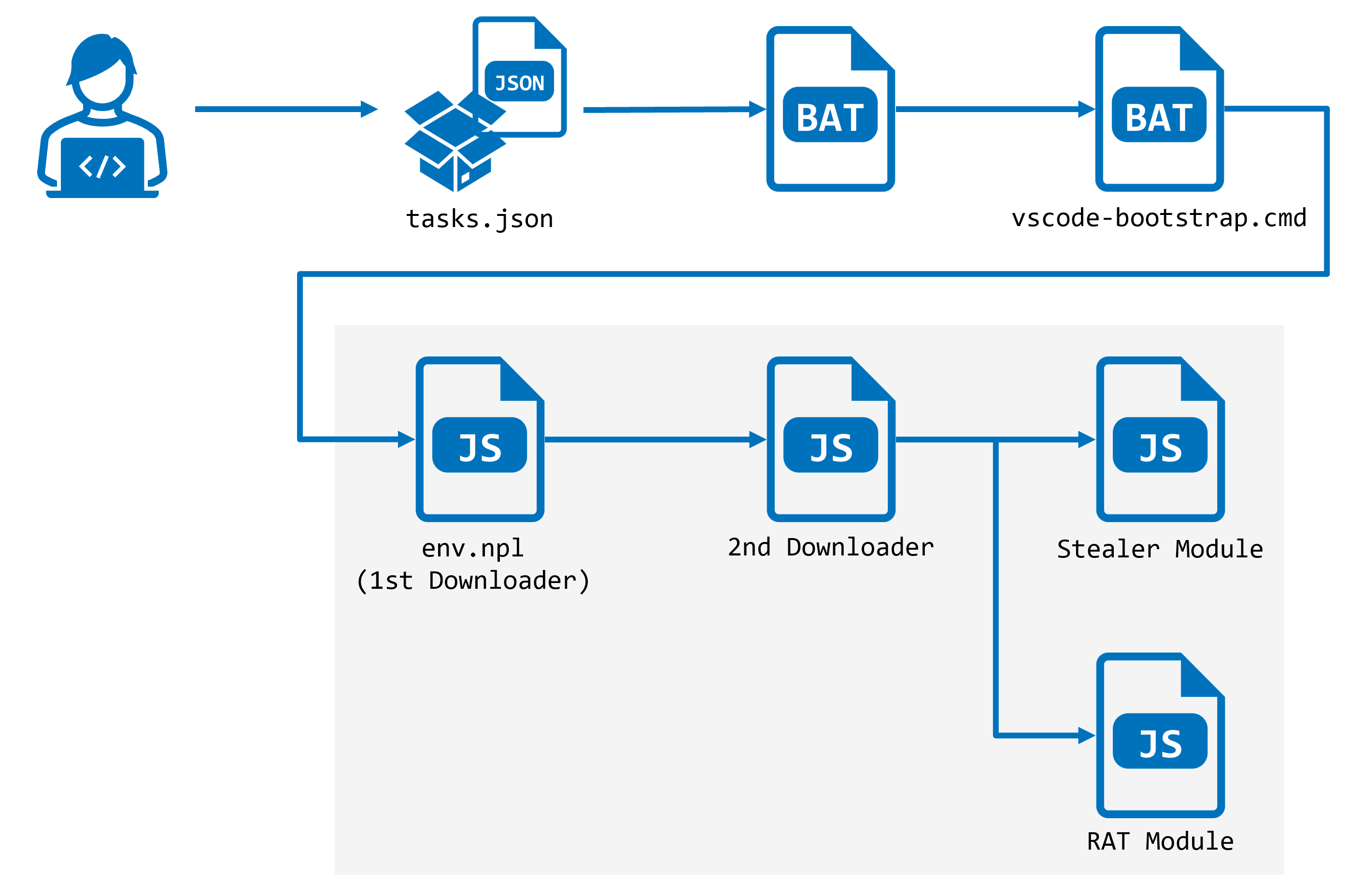
- A dropper is being committed straight into developer repositories and executes on dev-server start or when VS Code opens the folder, with no npm install involved.
- The vector is a .vscode/tasks.json task set to runOn folderOpen, with hide, reveal never and echo false so nothing appears in the terminal panel.
- Another sits in postcss.config.js, which reads as four lines of Tailwind config but carries 9,135 characters on line five behind padding.
Why it matters
- constraint Install-time hygiene sits on the wrong side of this. Lockfile pinning, registry allowlists and dependency review are never consulted, because nothing is installed.
- capability The operator can relocate all infrastructure with a single transaction that no defender can delete, which makes an IP blocklist accurate only until the next block.
- exposure Exposure is not scoped to the project. Anything copied on the machine that opened the folder is in reach, including credentials for systems the repository never touches.
- decision Teams that use folderOpen tasks for real now have to justify each one, because the grep that finds the dropper also finds their own automation.
The two hiding tricks are aimed at different readers. A file in `public/fonts/` is not opened by anyone reviewing a diff, and this one is not a font: it begins with 507 spaces where a real WOFF2 begins with the bytes `wOF2` [5]. The `postcss.config.js` is aimed at the person who does open the file. It renders as four correct lines of Tailwind plugin config and weighs 9,205 bytes, because line five runs 9,135 characters past the closing brace, mostly spaces, then payload [6]. That is about 99 percent of the file sitting off the right edge of an unwrapped pane [17]. Five months of dwell time on one sample [2], per the field guide published on dev.to, is what that buys.
Read the task flags rather than the label: `hide: true`, `reveal: never`, `echo: false`, and `runOn: folderOpen`, which is what makes the editor the trigger [3]. What it executes is `node ./public/fonts/fa-solid-400.woff2` [4]. A developer who never opens the folder in VS Code is not out of it either, because Next.js `require()`s the postcss config on every `next dev` and `next build` [7].
The loader carries no server address at all [8]. It reads the newest outbound transaction from a hardcoded wallet through Blockscout, then decodes the first eight bytes of the 20-byte destination address into a primary and a fallback IPv4 address [9]. Eight of twenty bytes used, twelve ignored [18]: there is room in that field for more than the operator currently needs. Cutting off one RPC provider does nothing, because the resolution falls through four of them [8]. And the stage-two fetch is plain HTTP pointed at port 443 [10], so an egress rule written around port numbers rather than protocols has nothing to object to.
The four suggested checks [14] have a sequencing problem worth naming. Grepping `.vscode/tasks.json` for `folderOpen` requires the clone to be on disk, which means fetch and inspect must happen before the editor is ever pointed at the directory. Once it has run, `spawn` with `detached: true` followed by `unref()` reparents the process to init, so it outlives the editor that started it [12]; quitting VS Code is not a remedy, and the `ps` check is the only one of the four that finds a live loader [14]. The wallet grep, including the history pass, catches this operator only, since deleting the file does not remove it from Git [16].
The observed payload polls the clipboard every 200 ms [13]. That is five reads a second, 18,000 an hour [19]. A token pasted once into a terminal on that machine is captured whether or not it has anything to do with the repository.
What to watch
- Whether VS Code starts gating folderOpen tasks in freshly cloned or untrusted directories, given the feature is legitimate as shipped.
- Whether the hardcoded wallet keeps publishing transactions, and whether Blockscout or the RPC providers act on reads pointed at it.
- Whether the padded-line trick shows up in other config files that frameworks require at dev-server start.
Clarity's read
What the record supports and how the coverage leans. The claims behind it follow.
Reality
- Evidence46
- Adoption22
- Hype gap+14
- Incentives58
- Confidence45
Claim ledger
Ranked by verification strength, evidence, and original report placement.
- [1]
A dropper family is being committed directly into developer repositories; it does not require npm install, and runs when the dev server starts or when VS Code opens the folder.
- [2]
One sample sat in a repository for five months before anyone noticed.
- [3]
The committed .vscode/tasks.json defines a shell task labelled eslint-check with hide: true, presentation reveal: never and echo: false, and runOptions runOn: folderOpen, so VS Code executes it when the folder is opened.
- [4]
The task command executes node ./public/fonts/fa-solid-400.woff2.
- [5]
public/fonts/fa-solid-400.woff2 begins with 507 spaces followed by JavaScript; a genuine WOFF2 file begins with the magic bytes wOF2. Disguising the payload as a binary asset keeps it out of review.
- [6]
The committed postcss.config.js displays as four correct lines of Tailwind plugin config but is 9,205 bytes; line 5 is 9,135 characters long, consisting of roughly nine thousand spaces after the closing brace followed by the payload, with no wrapping or horizontal scrollbar to reveal it.
- [7]
Next.js require()s postcss.config.js on every next dev and next build.
- [8]
The loader ships with no server address; it queries public Ethereum RPC endpoints, falling through a list of 1rpc.io, drpc.org, publicnode and blastapi, so cutting off any single one changes nothing.
- [9]
The loader reads the newest outbound transaction from a hardcoded wallet via the Blockscout API, takes the transaction's destination address, decodes the first eight bytes of that 20-byte address as two IPv4 addresses (primary and fallback), and fetches stage two from the resulting IP. The operator moves all infrastructure by sending one transaction, and every infected machine picks up the new address on its next run. The technique is documented as EtherHiding.
- [10]
The decoded address is assembled into a stage-two URL of the form http://${o}:443.
- [11]
Stage two arrives XOR-encoded, is decoded in memory and eval'd, so nothing is written to disk and there is no artifact to scan afterwards.
- [12]
Stage two is launched with spawn(..., {detached: true}) followed by unref(), so the process reparents to init and outlives the editor that started it.
- [13]
The payload observed in the wild was a clipboard stealer polling every 200 ms.
- [14]
The post offers four checks: a ps -eo pid,args grep for a running node loader; a recursive grep for the operator wallet 0xa322E5f3D311D3080e6f0121063e9aDC2490Ef1a; a git log --all -S pickaxe search of history; and a grep for folderOpen in .vscode/tasks.json.
- [15]
runOn: folderOpen is a legitimate VS Code feature, so a grep hit is not automatic proof; the reader must inspect what the task actually executes.
- [16]
Deleting the file does not remove it from Git, so history must be searched separately.
- [17]
Line 5 of postcss.config.js accounts for 9,135 of the file's 9,205 bytes, about 99 percent of it, and none of that is visible past the fifth column in an unwrapped editor pane.
- [18]
Only 8 of the 20 bytes of the destination address are used to encode the two IPv4 addresses, leaving 12 bytes unused.
- [19]
A 200 ms clipboard poll is five reads per second, or 18,000 reads per hour.
Sources
1 independent publisher whose own reporting we read for this story.
- dev.toMalware that runs the moment you open the project
1 article · August 25, 2026
Topics and entities
Follow any of these and your For You feed starts watching them — no settings page required.