Published Build3 min read
Gemini Note Taking Comes to the Conference Table, and Consent Policy Has to Catch Up
Google Meet's in-person "Take notes" turns a phone on a table into a transcript, summary, and Drive document. The retention hooks and edition gating are documented; how people in the room get told is not.
Written for builders.See today for builders
What happened
- On August 13, 2026, Google Meet began rolling out its Gemini-powered "Take notes" capability for in-person meetings, starting with Android, according to 9to5Google.
- Web support for the in-person note taking feature is due next, and 9to5Google reports the iOS rollout will begin at the end of August.
- The Take notes feature had previously been limited to online meetings.
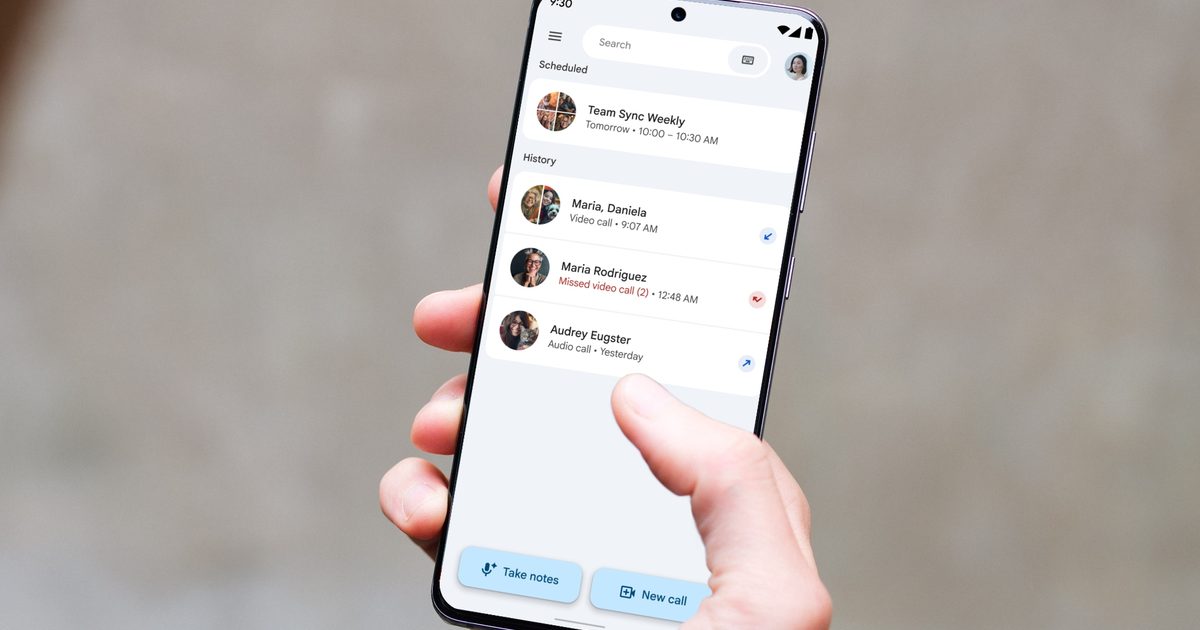
- On Android and iOS, users see a new "Take notes" icon at the bottom of the screen next to "New call"; on the web it is available at meet.google.com, according to 9to5Google.
- Users start a session, place the device nearby, and can stop or pause and resume capture.
Compiled by The EngineerSomething wrong?How this is made
Why it matters
Google Meet began rolling out Gemini-powered "Take notes" for in-person meetings on Android on August 13, 2026, with web support next and an iOS rollout at the end of the month, according to 9to5Google [1][2]. The capability had previously been limited to online calls [3], so the change converts a phone lying on a table into a transcription endpoint, which makes consent handling and licence gating an operational question this month rather than next quarter.
The mechanics are thin by design. A user taps a "Take notes" icon that sits at the bottom of the Android and iOS app next to "New call," or starts from meet.google.com on the web [4]. They begin a session, place the device nearby, and can pause, resume, or stop capture [5]. When the session ends, Meet produces a full transcript, a summary, and a list of action items [6], saves the result as a Google Doc in the user's Drive, and emails a link to it [7].
That output path is the part administrators should care about. Google states that AI notes stored in Docs follow Meet retention policies, and that notes from Calendar-scheduled meetings are attached to the corresponding meeting [8]. A summary of a corridor conversation therefore lands inside the same retention and access-control regime as any other Meet artifact, not in someone's notebook.
On licensing, consumer accounts need a Google AI Pro or Google AI Ultra subscription [9]. 9to5Google lists Business Standard, Business Plus, Enterprise Standard, Enterprise Plus, Frontline Plus, and Google AI Pro for Education among the eligible Workspace offerings [10], while Google's own administrator documentation names only Business Standard, Business Plus, Enterprise Standard, and Enterprise Plus as supported editions for AI note-taking [11]. Two of the six offerings in the press list, Frontline Plus and Google AI Pro for Education, do not appear in the documented set [12]. Confirm against your own contract before you tell frontline staff they have this, or that they do not.
Control exists: administrators enable or disable the feature in the Admin console under Meet's Gemini settings [13]. Google's documentation states that once the meeting organizer has enabled it, anyone in the meeting can start note-taking [14]. Consent is where the record goes quiet. Google's June product post about the online "Take notes for me" workflow says participants are notified when the feature is enabled [15][16]. The material describing the in-person rollout does not state how people sitting in a room, who may not be joined to any Meet call, receive equivalent notice [17]. Until that is documented, notice is a policy you have to write and enforce, not a setting you can tick.
The quality limits are stated plainly. The launch supports one language at a time, and 9to5Google reports a recommended meeting length of 15 minutes [18]. Google's administrator documentation lists English, French, German, Italian, Japanese, Korean, Portuguese, and Spanish, and says meetings containing multiple spoken languages are not currently supported [19]. Output quality and downstream usefulness depend on audio capture conditions, speaker overlap, language consistency, and review of automatically generated action items [20].
Watch three things. Whether the iOS launch actually lands at the end of August, roughly two and a half weeks behind Android [21]. Whether the administrator documentation is extended to cover Frontline Plus and Google AI Pro for Education, or the press list was ahead of the product [12]. And whether Google publishes an in-room notification behaviour to match the notification it already documents for online calls [16][17].
Claim ledger
Ranked by verification strength, evidence, and original report placement.
- [1]
On August 13, 2026, Google Meet began rolling out its Gemini-powered "Take notes" capability for in-person meetings, starting with Android, according to 9to5Google.
- [2]
Web support for the in-person note taking feature is due next, and 9to5Google reports the iOS rollout will begin at the end of August.
- [4]
On Android and iOS, users see a new "Take notes" icon at the bottom of the screen next to "New call"; on the web it is available at meet.google.com, according to 9to5Google.
- [5]
Users start a session, place the device nearby, and can stop or pause and resume capture.
ReportedView cited source - [6]
After a session ends, Meet generates a complete transcript, a summary, and a list of action items.
ReportedView cited source
Sources & coverage · 1 publisher
The reporting this story was synthesized from, earliest first. Every link goes to the original.
- letsdatascience.comAug 13Google Meet Adds In-Person Gemini Note Taking
Cited in this coverage: 9to5Google, via letsdatascience.com report
Additional citations
- 9to5Google
- Google documentation
- Google Workspace administrator documentation
- Google June product post