Product1 publisher2 min readPublished
WhatsApp replaces the iPad tab bar with a Mac-style sidebar by default
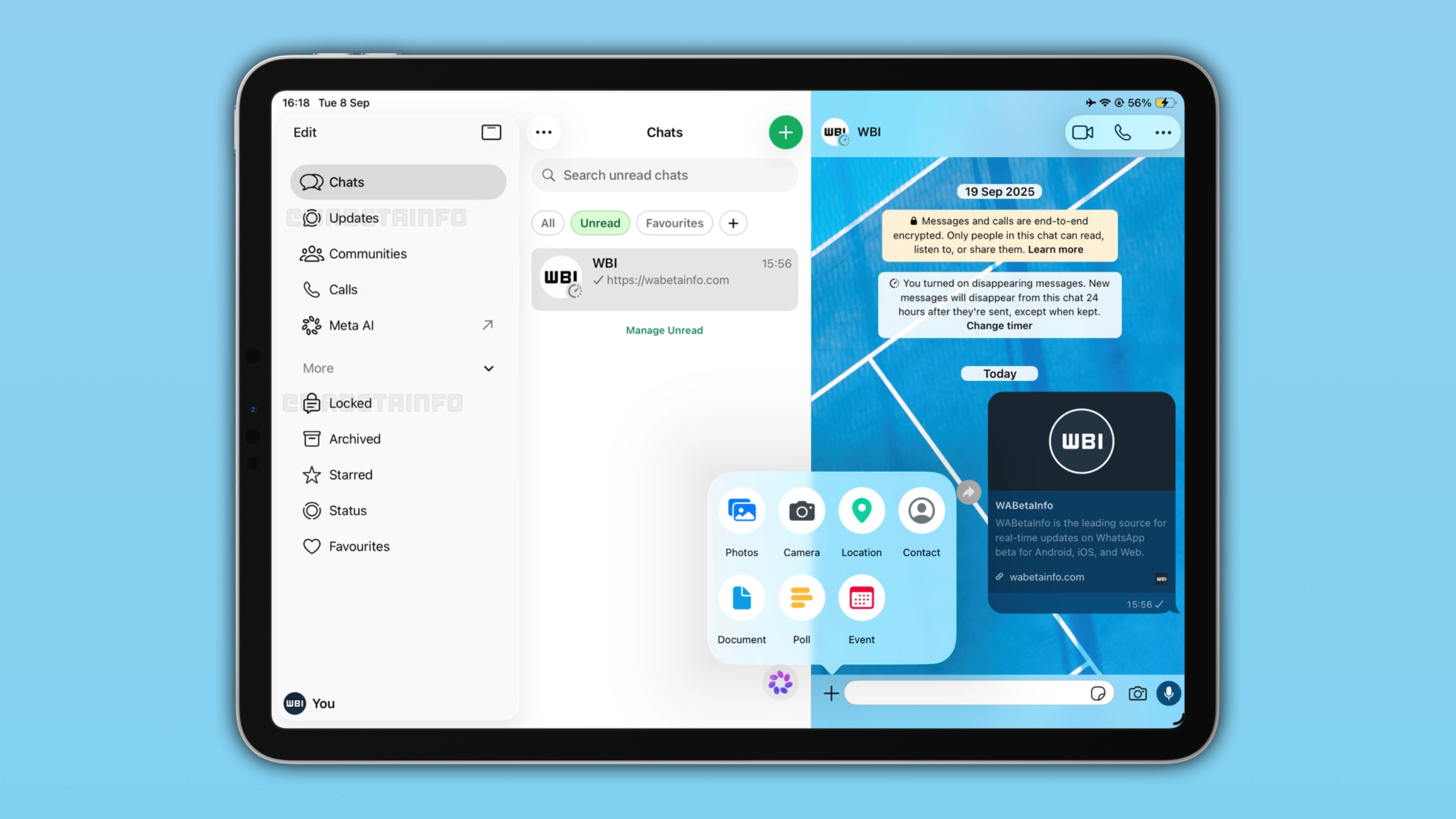
WABetaInfo reports the sidebar is taking over from the bottom tab bar on iPad, and it is turning up on both TestFlight and regular App Store installs, so two people on the same build can see different navigation.
The Product Desk · Product desk
What happened
- WABetaInfo reports that WhatsApp is giving some iPad users a Mac-like sidebar that replaces the bottom tab bar as the default navigation.
- The sidebar mirrors the layout already in WhatsApp for Mac and offers quick access to Chats, Updates, Communities, Calls, Meta AI and other sections of the app.
- WhatsApp began adapting its iOS app for Liquid Glass last October and only brought the redesign to iPad in a limited beta last June, which kept the iPhone bottom tab bar.
Compiled by The Product DeskSomething wrong?How this is made
Why it matters
- constraint Runbook steps that name a screen position now describe a layout only part of the team has, and WhatsApp's rollout order decides which part.
- decision Whoever owns the screenshots has to pick a moment: reshoot now and the images show a layout some staff do not have yet, or wait and leave the old images wrong for the people who already flipped.
- exposure Meta AI sits in the iPad app's primary navigation next to Chats and Calls, so on a shared work iPad it is a standing row in front of whoever is holding the device.
A support rep opens the shared iPad, gets to step three of the runbook, and reads that the next thing to do is tap Chats at the bottom of the screen. There are no tabs at the bottom of the screen. There is a sidebar down the left.
The way this is arriving is what makes it awkward to manage. WABetaInfo says the sidebar is reaching some testers on the latest TestFlight build, and that some people on the regular App Store version are also starting to see it [6]. So the version number in Settings will not tell a team lead which layout a colleague is looking at, and 9to5Mac says WhatsApp rollouts often take a while to reach everyone on either channel [9].
Here is what users do when the chrome moves: they tap where the control was, then they start hunting. Here is what teams tell themselves users do: read step three, find the named control, proceed.
The report names five sidebar destinations and then says "other sections of the app," so a doc that lists the navigation cannot be exhaustive from what has been published [3][10]. Hiding is supported, and the effect is described precisely. "When users hide the sidebar, WhatsApp expands the chat list and the conversation toward the center of the screen, making both feel less compressed," WABetaInfo wrote [5]. The report does not say whether hiding it brings the bottom tab bar back [11].
For a team that documents WhatsApp workflows, the useful sort is by what each step names. A step that names a position on screen (the bottom bar, the third tab from the left, the icon under the keyboard) depends on chrome the vendor changes on its own schedule, and you find out it broke when a rep messages the channel. A step that names a destination ("open Chats", "open Calls") survives a navigation change and costs nothing extra to write. The same test sorts your image library: a cropped shot of a conversation ages slowly, a full-app shot with the tab bar in frame is wrong the moment the default flips for that person.
I would spend the editing pass before the reshoot. Stripping position words out of the steps works for both layouts at once and takes one person an afternoon. The tradeoff is real: a step that says "open Chats" and not where Chats is gives a new hire less to go on, and someone will ask.
What to watch
- Whether WhatsApp adds a setting that restores the bottom tab bar on iPad, or the sidebar becomes the only layout.
- Any sign of the same sidebar default landing in WhatsApp Business on iPad.
- How long the two layouts coexist on stable App Store installs before the sidebar is universal.