Product1 publisher3 min readPublished
Microsoft stacks a Copilot dashboard on top of the in-app assistants in Microsoft 365
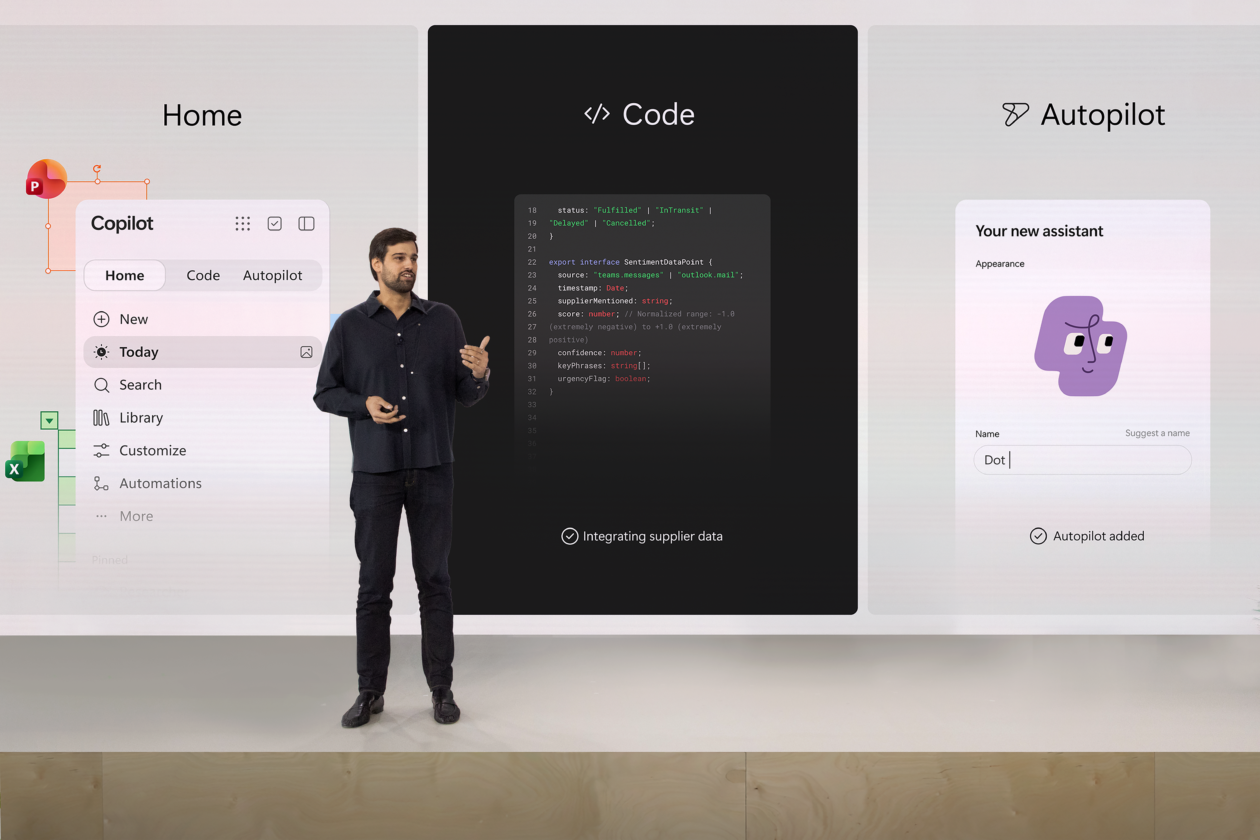
Microsoft made Copilot a Microsoft 365 workspace with three new experiences, Home, Code and Autopilot, while keeping its assistants inside Word and Excel. Admins now train staff on two entry points and have to decide who may point Code's no-code apps at live business data.
The Product Desk · Product desk
What happened
- At its Copilot event, Microsoft made Copilot a unified workspace at the center of Microsoft 365 that connects documents, conversations, data and tasks.
- Home, the new landing spot, is a dashboard of recent activity, suggestions and tasks that stays connected across Word, Excel, PowerPoint and Teams.
- Copilot inside the apps also gained features: PowerPoint keeps slides on brand, Excel explains changes in plain language, and Word refines shared documents.
Compiled by The Product DeskSomething wrong?How this is made
Why it matters
- cost Per-app Copilot training stays in use alongside new Home training, so helpdesks end up supporting two entry points for the same drafting and summarising tasks.
- exposure Non-developers can put dashboards and workflows on live business data through Code, so each app they build needs an owner and a review path before it spreads.
- constraint With an October private preview and a later Outlook and Teams expansion, a rollout plan cannot promise every user the same Copilot on day one.
Expect a helpdesk ticket like this one in the first week. A user opens Copilot and lands on Home, a dashboard of recent activity and suggested tasks [4]. An hour later, in Excel, a second Copilot explains their edits in plain language [5]. The ticket asks which one they are supposed to use.
Here's what teams tell themselves users will do: go to one place. Windows Central's account of Microsoft's Copilot event describes Copilot leaving individual apps to become a unified workspace across Microsoft 365 [1][2]. Here's what the same announcement has users doing: working in Home and inside the apps, where PowerPoint now keeps slides on brand and Word refines a document while teammates edit it [5]. Users get two places to ask for the same draft [1]. Windows Central wrote that the in-app changes make Copilot "feel like part of the workflow instead of a separate tool," then added: "At least that's the goal here." [13]
Satya Nadella's keynote named two design principles: keeping people "in the flow of work" and helping organizations build systems that learn continuously [12]. "AI has to be shaped in such a way that it's working for your firm to create and retain more knowledge," Nadella said [11].
The part of the launch that lands on an admin's desk is Code. It uses the same technology as GitHub Copilot, and it lets anyone describe a tool in plain language and have it built inside their Microsoft 365 environment [8]. The output can be a dashboard, a workflow or a lightweight app connected to live business data [9]. According to Windows Central, Code runs in a secure sandbox and draws context from Microsoft IQ [10]. The account names Autopilot as the third new experience [3] but does not describe it, and it does not cover admin controls or pricing for any of the three.
Timing splits the rollout. Today, the view inside Home that surfaces missed emails, meetings and tasks [6], enters private preview in October, and Microsoft plans to bring it to Outlook and Teams later this year [7].
In my view, the sensible order is to pilot Home with teams whose day is mostly catching up. Code goes to a named group, with a data owner attached to every app it ships. That order has a cost. The feature built for people who have never written code reaches them last. Staff told that Copilot now lives in one place will also use two for a while [1].
Sort each team on two lines. One is where its day starts: inside a single app, or in a queue of messages and tasks. The other is whether it would build anything that reads live business data [9]. Teams that start in one app and build nothing keep their per-app training, and Home is optional for them. For queue-first teams that build nothing, Home is the pilot, and a broad push can wait until Today reaches Outlook and Teams [7]. Where an app-first team wants to build, Code requests go through whoever owns that app's data. Queue-first builders get Code last, with an owner and a retirement date for each app. Judge the pilot by two numbers: Code-built apps still in use after a month, and minutes from opening Home to a finished draft.
What to watch
- Whether Microsoft publishes admin controls for Code, such as who may build apps and which data sources those apps can reach.
- Licensing and pricing for Home, Code and Autopilot, none of which the Windows Central account covers.
- A description of Autopilot, the third experience, and whether it acts on business data in ways that change the governance picture.